
Grok is xAI's chatbot, and it has a personality and a few strengths that set it apart from the rest of the field. But the place most people meet Grok, inside the X app, is tied to a social account and is a poor fit for confidential work. This page covers what Grok is actually good at, what people mean by a private Grok or anonymous Grok, and how Secret Chat works as a private Grok alternative and secure Grok alternative through a gateway that uses the xAI API, with chats kept in local browser storage.
For the broader product context (multi-model access plus local storage) see our main private AI chat page, or compare providers on the private AI models page.
Grok is a trademark of its respective owner xAI. Secret Chat is an independent product and is not affiliated with, endorsed by, or sponsored by xAI. See our Disclaimers for details.
What Grok is good at
Every leading model has a slightly different character, and Grok's is unusually distinct. These are the areas where it tends to stand out, keeping in mind that exact capabilities depend on the model version and the access you have.
A direct, conversational personality
Grok is built to talk like a person rather than a cautious corporate assistant. It tends to be candid, informal, and quick with a bit of humor, which many people find makes brainstorming and back-and-forth discussion feel more natural. If you want a model that gives you a straight answer in a relaxed tone, Grok is a strong pick.
Awareness of current topics
Grok reaches current information through xAI's live web and X search tools, which the app attaches on its Web Search and Deep Research modes. That is worth stating precisely, because the model has a training cutoff like any other and xAI is explicit that it has no realtime information unless those tools are switched on. With them on, it's often more comfortable than other models with recent events and what people are talking about right now. That makes it useful for getting up to speed on a developing topic or understanding the gist of a current conversation, though, as with any model, anything time-sensitive or important is worth verifying against a primary source, since fast-moving and social content can be incomplete or wrong.
Reasoning, coding, and analysis
Recent Grok versions added serious reasoning ability, with dedicated modes that think a problem through step by step. In practice that means Grok can hold its own on coding help, math, structured analysis, and multi-step questions, not just casual chat. It's a capable general-purpose assistant for drafting, explaining, and working through ideas.
Working with images
Grok can understand images you share and discuss what is in them, and xAI's tooling also includes image generation. Within Secret Chat you can use Grok for picture-based tasks alongside text, which is handy when a question is easier to show than to describe.
How Grok helps in everyday work
Put together, those strengths make Grok a good fit for quickly understanding a trending subject, drafting something in a lively voice, talking through a coding or logic problem, or simply having a more natural conversation with an assistant. As always, treat its output as a strong first draft to review rather than a final, verified answer.
How to use Grok on Secret Chat
Grok — smart and agentic
The full Grok is "agentic," which simply means it can decide how to handle your request on its own. By default it runs in Smart Agentic mode: it works out what you actually need, whether that's a quick reply, a fresh web search, deeper research, or a generated image, and takes care of it for you, without you having to choose.
Prefer to choose yourself? You can
If you'd rather steer, you can switch Grok's mode by hand at any time:
- Smart Agentic — the default; Grok decides the best way to answer.
- Fast Chat — a quick, straightforward reply.
- Web Search — an answer based on a fresh look at the web.
- Research — a slower, more thorough, in-depth answer.
- Create Image — generate a picture from your description.
Looking for a quick, free model for everyday questions? That role now belongs to DeepSeek USA, which replaced the old Grok Fast. It's faster, stronger at reasoning and code, and free for everyone.
In Smart Agentic, Web Search, and Research modes, Grok can search the internet for you, give you links to the sources it used, and open and read web pages, so its answers can draw on up-to-date information rather than memory alone.
So you get the convenience of an assistant that organizes the work itself, with the option to take the wheel whenever you want.
Why a private Grok matters
The same things that make Grok fun to use, a social-account login and awareness of your activity, are exactly what you don't want when the topic is sensitive. For anyone handling client information, business data, or personal matters, sending that text through a consumer chatbot tied to your identity can be a real problem: the prompt leaves your device, may be retained, and can be linked back to you.
A privacy toggle is a policy promise, not a structural change. A private Grok setup changes the structure instead: who holds the account, where your conversation history lives, and which data terms apply to the request.
Where consumer Grok falls short
Grok inside the X app is convenient, but it has several properties that make it a weak fit for confidential work:
- Tied to a social account. Using Grok through X links your prompts to your real X identity and activity.
- Consumer training defaults. On consumer terms, your interactions with Grok can be used to improve the model unless you actively opt out.
- Account-linked history. Your conversations form a long-term trail attached to your account.
- Server-side storage. Your chat history lives on the provider's servers, not on your own device.
How a secure Grok alternative works
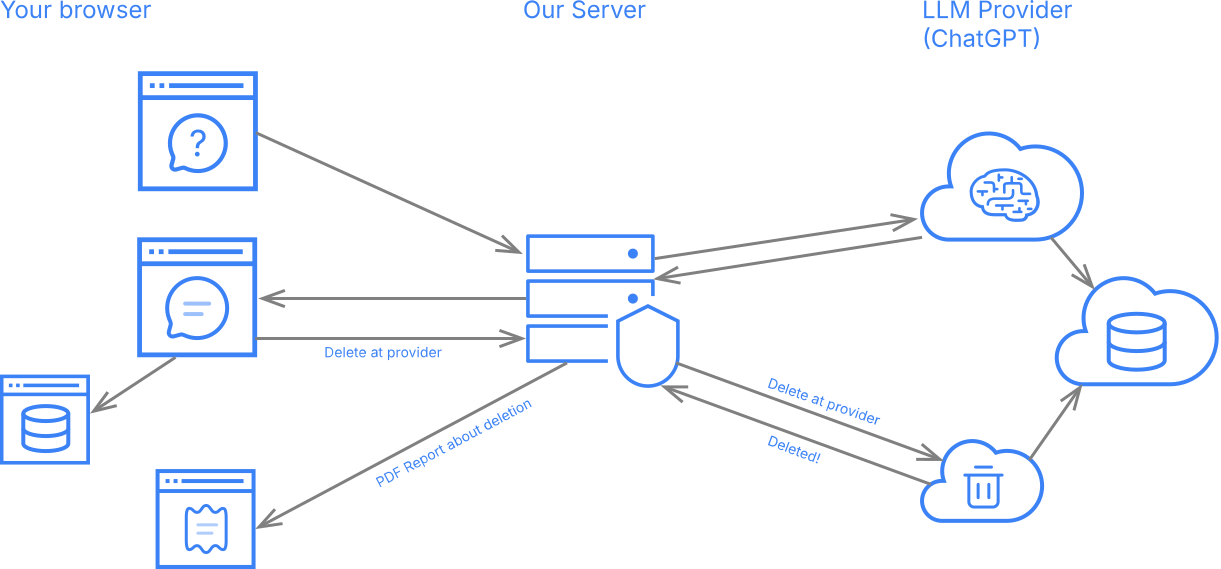
The practical way to get a more private Grok experience is through a secure gateway. Instead of you holding a consumer account inside X, the gateway holds an xAI API account and forwards requests on your behalf. The model provider sees the gateway as the caller, not your name, your handle, or your IP. For the cross-provider picture, see our private AI models comparison.
This isn't a self-hosted model, and it doesn't turn Grok into an open-source model you run locally. It's a different access path to the same Grok models, governed by the xAI API's data terms rather than the consumer terms inside X.
What Secret Chat does as a private Grok setup
Anonymized access: no profile, no association
This is the core of it. Secret Chat is an anonymizer: we build no profile of you and never store your queries against your identity or associate them with you. The email you sign up with is used only for account access and payment, never to link your prompts to you. So every request reaches xAI with no name, account, or IP attached, and you use Grok as a stranger. That reframes retention: even where xAI's API keeps data for a window, what is kept is not linked to you. The honest boundary is that this anonymizes who is asking, not what the prompt says. xAI still reads your text to answer it, so remove any names or identifiers you wouldn't want it to see.
Minimal account, local storage
Registration uses an email only — no real name, no phone number, no profile-building. Your conversation history and uploaded files are stored in your browser's local storage (IndexedDB for text chats, OPFS for images and PDFs); we don't keep a server-side copy of your conversations.
Grok accessed through the xAI API
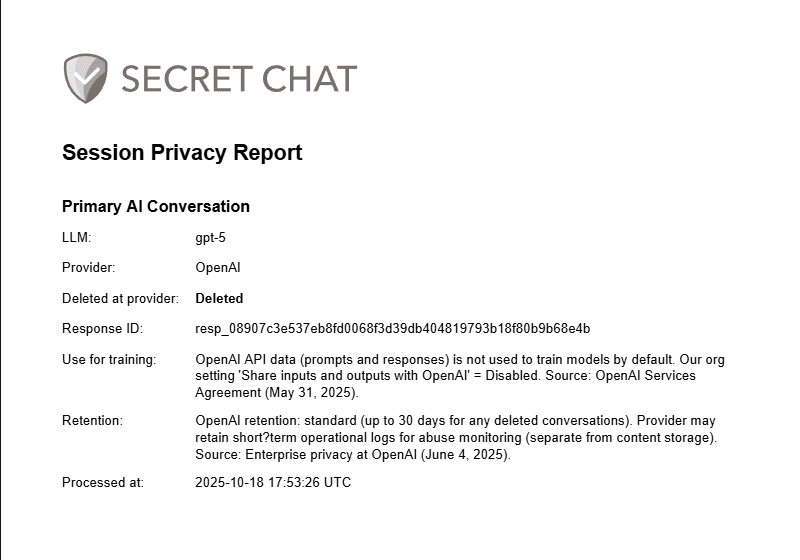
The xAI API is governed by different data terms than consumer Grok, with a retention window of up to 30 days for abuse monitoring and no training on API traffic. Secret Chat additionally sends an explicit deletion request to xAI for the relevant session, and records the outcome in a per-message Session Privacy Report (PDF) you can keep on file.
Documents and images
With Grok you can upload images and PDFs to discuss or work from. Grok is the one model that cannot read a document inline: xAI's API only accepts a file that has been uploaded to it first, so Secret Chat uploads your PDF for the length of that one request, has Grok read it, and then deletes it from xAI again, with a short automatic expiry as a backstop in case that deletion ever fails. Word files, spreadsheets, PowerPoint decks, CSV, text and code files and zip archives of them are handled differently across the platform: they are converted to text in your browser and only that text is sent, so no upload to xAI is involved for those — see attachments.
Honest scope: what this is and isn't
A private Grok setup like this removes the most common privacy weaknesses of consumer Grok: a social-account login, identity exposure to the model provider, and consumer-tier training defaults. It isn't a fully anonymous network, it doesn't change what the underlying Grok model itself can or cannot do, and it doesn't delete data already held on xAI's side beyond their API retention window. Your prompt still reaches xAI's API to be processed, so deciding what is appropriate to include, and removing personal or confidential details first, remains your responsibility.
Secret Chat as a private Grok alternative
Secret Chat is a private AI chat app with multi-model access and local browser storage. Used with Grok, it gives you:
- Email-only registration: no name, no phone, no social login.
- Local browser storage for chats (IndexedDB) and uploaded files (OPFS). See how local browser storage keeps AI chat history private.
- Grok requests routed through the xAI API, with an explicit deletion request per session.
- A Session Privacy Report PDF for each message that records how the request was handled.
- The option to switch to GPT, Claude, or Gemini within the same interface and even in the same dialogue.
- The AI Council — Grok's mid tier sits on the panel with ChatGPT, Claude and Gemini, each answer revealed as that model finishes, and a referee then lays the claims side by side: which model asserted each one, which contradicted it, which never mentioned it. Choose a Duet of two models, a Trio of three, or the full Quartet; a Duet on a lighter pair is free within the daily quota. No vendor's own app offers that comparison.
FAQs about Private Grok
What is Grok best at? +
Grok stands out for its direct, conversational style, its comfort with current topics when its live web and X search tools are attached, and, in recent versions, solid reasoning, coding, and analysis. It's a capable general-purpose assistant with a more relaxed personality than most. Capabilities vary by version and access.
Is there a private version of Grok? +
xAI doesn't offer a dedicated "private Grok" product to consumers. The closest practical option is to access Grok through a gateway that uses the xAI API and keeps your history off its servers, like Secret Chat, which makes the experience safer, though not completely anonymous.
Can I use Grok without an X account? +
Using Grok inside X requires an X account that links prompts to your identity. Secret Chat lets you use Grok with an email-only registration instead: no name, no phone number, and no social login.
Does Secret Chat make Grok completely safe for sensitive data? +
No tool can promise that. Secret Chat makes Grok safer by decoupling requests from your identity, keeping history in your browser, and sending a deletion request per session. But your prompt still reaches xAI's API to be processed, so you should remove personal or confidential details before sending and verify anything important.
How can I be sure my Grok data is deleted? +
Look for verifiable evidence rather than a promise. Secret Chat's Session Privacy Report records, per message, the retention regime that applied and, for Grok and OpenAI, whether the explicit deletion request was acknowledged.
Can I put Grok's answer next to ChatGPT's or Claude's? +
Yes. That's the AI Council. One question goes to Grok, ChatGPT, Claude and Gemini at once, each answer appearing as that model finishes, and a referee then extracts the factual claims and shows which model asserted each, which contradicted it and which never mentioned it, with a short synthesis of what at least two models agreed on. You can run two of them, three, or the whole bench, and a Duet on a lighter pair is free within the daily quota; when the question turns on current facts the whole panel answers with live web search attached. Bear in mind that agreement is evidence, not proof (the models can be wrong together), and that a council widens where your text travels, since it reaches every model on the panel plus the referee.